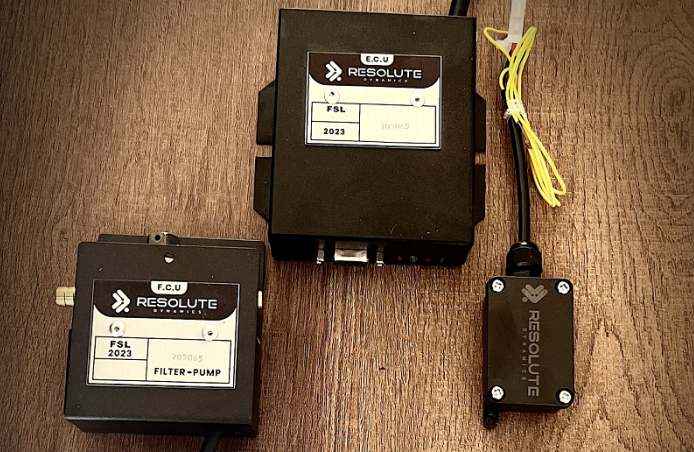
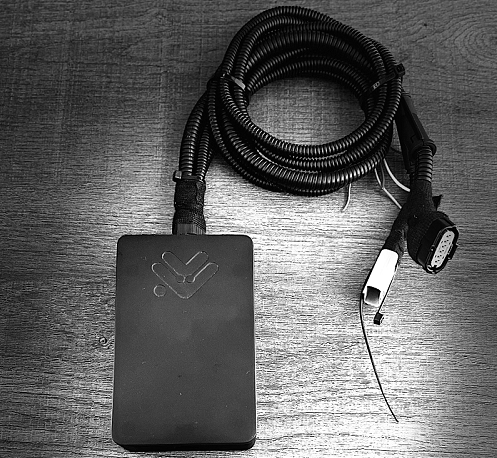
If your vehicle has a speed limiter installed and something doesn’t seem right, you might wonder, “Can I fix this myself?” The answer is: sometimes yes, but sometimes absolutely not.
Speed limiters are more complex than they seem — they’re not just devices that “slow down the car.” They’re smart, electronic systems connected to the engine control unit (ECU), GPS, terrain recognition, and safety mechanisms.
Let’s walk through what you can troubleshoot at home — and what you really shouldn’t touch without a professional.
The Rise of Speed Limiters and DIY Curiosity

Speed limiters are everywhere now. From school buses to delivery vans to private cars — especially in regions where regulations demand speed control — these devices have become a standard part of vehicle safety.
It’s no surprise that some drivers and fleet managers want to troubleshoot issues themselves. After all, taking your vehicle to a technician can be expensive and time-consuming.
But speed limiters aren’t your usual plug-and-play gadget. They’re connected to critical vehicle systems. One wrong move can lead to legal trouble or even put lives at risk.
How Speed Limiters Work: The Basics You Need to Know
To troubleshoot a speed limiter, you first need to understand what it is and how it functions.
A speed limiter (also called a speed governor) is a device that prevents a vehicle from going beyond a certain speed. It works by communicating with the ECU (Engine Control Unit). Some limiters use GPS to apply different limits based on location or terrain — like in school zones or hilly areas.
There are a few main types:
-
Single Speed Limiters: Set to one fixed speed.
-
Dual Speed or Terrain-Based Limiters: Adjust speed based on road conditions or location.
-
RPM-Based Limiters: Restrict engine RPM instead of speed directly.
These systems often include sensors, control modules, GPS antennas, and override switches. Modern ones are integrated with vehicle diagnostics and telematics.
Common Speed Limiter Problems You Might Face
Even though speed limiters are designed to be robust and reliable, they can sometimes act up — especially if the vehicle’s electrical system, GPS, or control unit is disturbed.
Whether you’re driving a delivery van with a terrain-based limiter or managing a school bus fleet with a GPS-integrated governor, these are the most common issues you might encounter — and what they usually mean.
1. Speed Limiter Doesn’t Engage at the Set Speed
This is one of the most frequent complaints. You’re driving, expecting the vehicle to cap its speed at a certain threshold — but it doesn’t. The limiter either stays passive or allows the vehicle to go beyond the defined limit.
Possible Causes:
-
Faulty speed sensor (like a damaged VSS – Vehicle Speed Sensor)
-
Miscommunication with the ECU (Engine Control Unit) via the CAN bus system
-
Blown fuse or damaged relay in the limiter’s power circuit
-
Disconnected GPS antenna in GPS-based systems
2. Limiter Engages Too Early or Too Late
If the limiter kicks in at 40 km/h instead of 60 km/h, or doesn’t activate until 80 km/h — something is off. This behavior can make driving unpredictable and sometimes dangerous, especially for fleet drivers.
Possible Causes:
-
Incorrect calibration data in the limiter control unit
-
Terrain mapping errors in dual-speed limiters
-
Delayed response from throttle actuator signals
-
Software bugs or mismatched firmware
In GPS-driven systems, terrain-based triggers may be outdated or poorly mapped, causing speed shifts in the wrong zones. This is particularly true if the system isn’t as advanced as a modern speed limiter device in Dubai, where adaptive solutions are now the norm.
3. Fluctuating or Inconsistent Speed Limiting
Another issue is when the limiter tries to engage but can’t hold a steady speed. It may pulse between allowing acceleration and then suddenly cutting power. This is not only frustrating — it can be unsafe.
Possible Causes:
-
Electrical interference in the CAN network
-
Faulty throttle control module
-
Weak voltage supply from a failing battery or alternator
-
Dirty or loose ground connection near the limiter module
In dual-speed limiters, terrain instability (like switching between hill and flat road repeatedly) can cause erratic speed behavior.
4. Dashboard Error Messages or Warning Lights
Modern vehicles with limiter systems often use the dashboard to report system faults. If you see symbols like a wrench icon, check engine light, or a blinking limiter symbol, pay attention.
Possible Causes:
-
ECU is detecting an internal software mismatch
-
Limiter module has stored Diagnostic Trouble Codes (DTCs)
-
Sensor failure — often RPM, GPS, or wheel speed sensor
-
Communication timeout between modules (e.g., OBD-II error: P0500 – Vehicle Speed Sensor Malfunction)
Use an OBD-II scanner to read codes and determine the fault source.
5. Limiter Stops Working After Battery Change
Believe it or not, something as simple as swapping out your car battery can throw the limiter off. This is because many limiter systems are voltage-sensitive and rely on memory-stored calibration settings.
Possible Causes:
-
Loss of memory in limiter’s volatile storage (if not backed up)
-
System didn’t reinitialize properly after power cut
-
Incorrect voltage supply during the reconnect process
-
Damaged voltage regulator sending unstable power
Some advanced limiters require a system re-calibration or “limiter wake-up procedure” after battery changes.
6. GPS Lag or Signal Drop
In GPS-based speed limiters, the limiter behavior depends on real-time satellite location data. If the GPS module is weak or delayed, the limiter might not function correctly — especially in urban areas, tunnels, or during bad weather.
Possible Causes:
-
Weak GPS antenna signal
-
Antenna location blocked by metal or poor placement
-
Corrupted satellite data cache
-
Faulty GPS module or firmware bugs
Vehicles in dense cities or mountainous regions are more prone to GPS inconsistencies.
7. Physical Component Damage – Wires, Switches, or Connectors
If you have a physical override switch (common in older or commercial vehicles), it might get worn out or stuck. Wires can become corroded or frayed, especially in high-heat environments like the engine bay.
Possible Causes:
-
Water damage or rust in connector terminals
-
Overheated wires due to poor insulation
-
Vibration-related wire fatigue
-
Broken override button or control pad
These small parts often get overlooked but can stop the entire limiter from functioning.
What You Can Safely Troubleshoot at Home
If you’re comfortable using a few basic tools and know your way around a vehicle’s dashboard or engine bay, there are several low-risk steps you can take to troubleshoot a faulty speed limiter.
While advanced diagnostics should be left to professionals, these at-home checks can help you identify minor issues, avoid unnecessary workshop visits, and even restore basic functionality — without touching sensitive systems like the ECU or firmware.
These steps also follow safe DIY practices and won’t void your warranty or put your vehicle out of compliance, as long as you don’t attempt to rewire or bypass the limiter system.
1. Check Physical Connections
One of the most common reasons a speed limiter stops working or behaves inconsistently is a loose or disconnected wire. Limiter modules are usually connected to the vehicle’s wiring harness and rely on constant power, ground, and data signals to function properly.
What to do:
-
Locate the speed limiter control unit — typically found under the dashboard, near the driver footwell, or sometimes mounted near the engine control module.
-
Check the connector plugs — gently press them in to ensure they’re snug.
-
Look for broken pins, corrosion, or bent metal contacts inside the plugs.
-
Inspect the wiring harness for signs of heat damage, friction wear, or rodent activity.
Red flags:
-
Burn marks near connectors
-
Wires that feel brittle or cracked
-
Moisture or greenish corrosion at terminals
2. Inspect Fuses and Relays
Speed limiters typically draw power through a dedicated fuse and sometimes a relay. If the limiter isn’t powering on at all — no lights, no response — a blown fuse could be the cause.
What to do:
-
Use your owner’s manual or fuse box diagram (usually on the fuse box cover) to identify the fuse linked to the “speed limiter,” “ECU,” or “auxiliary electronics.”
-
Pull the fuse using plastic fuse pullers or needle-nose pliers.
-
Hold it up to the light — if the metal strip inside is broken, the fuse is blown.
-
Replace it with a new fuse of the exact same amperage (e.g., 10A, 15A).
If the fuse blows again immediately after replacing it, this could indicate a short circuit or internal fault in the limiter module, and you should stop and consult a technician.
3. Use an OBD-II Scanner
An OBD-II scanner is one of the most powerful tools you can use at home. Plugging into your car’s Onboard Diagnostics Port, it allows you to read error codes stored by the ECU — and in some cases, the speed limiter module — when something isn’t working as expected.
What to do:
-
Locate the OBD-II port (usually under the dashboard on the driver’s side).
-
Plug in your scanner. Use a model that can read non-ECU modules or look for P-codes (Powertrain Faults).
-
Look for relevant codes like:
-
P0500 – Vehicle Speed Sensor Malfunction
-
U0100 – Lost Communication with ECM/PCM
-
P1501 – Vehicle Speed Control Malfunction
-
-
Use the scanner or a compatible smartphone app (e.g., Torque, Car Scanner) to clear the code after fixing the issue.
Many speed limiter problems are linked to sensor or communication faults, and an OBD scan can confirm if the limiter is receiving incorrect data or no data at all.
4. Clean Sensor Areas
Some speed limiter systems rely on input from external sensors, like a GPS antenna, a vehicle speed sensor (VSS), or a crankshaft RPM sensor. If these sensors are dirty, obstructed, or loosely mounted, they may send incorrect signals, causing the limiter to act erratically or not at all.
What to do:
-
GPS-based systems: Locate the external GPS puck or antenna, usually on the dashboard, under the windshield, or on the roof. Wipe off dust or grime using a microfiber cloth.
-
VSS or RPM sensors: These are harder to access but may be visible near the transmission housing. Visually inspect for debris, oil leaks, or dislodged connectors.
-
Avoid using any chemicals or sprays unless specified by the manufacturer.
Even minor debris on a sensor or loose housing can throw off data, leading to incorrect limiter behavior.
5. Reset the System (If Allowed)
Some limiter systems come with a manual reset or override option, especially aftermarket units or models designed for commercial fleets. A soft reset can often resolve temporary glitches caused by power interruption, GPS desync, or sensor lag.
What to do:
-
Check your speed limiter’s user manual for reset instructions.
-
Most soft resets involve holding down an override switch, pressing a reset button, or toggling the ignition with the switch engaged.
-
After resetting, turn the ignition off, wait 10 seconds, then restart the vehicle.
⚠️ Never attempt a “hard reset” or factory restore unless you’re guided by the manufacturer or a trained technician. Doing so could wipe out important configurations, terrain maps, or safety settings.
What You Shouldn’t Try Without Professional Help

When it comes to troubleshooting a speed limiter, knowing your limits is just as important as understanding the device itself. Speed limiters aren’t just accessories — they are integrated into a vehicle’s critical electronic systems, often linked to the Engine Control Unit (ECU), CAN bus, GPS navigation, and vehicle safety compliance modules.
One wrong move can lead to serious consequences: engine failure, legal issues, or compromised road safety.
Here are specific actions that should never be attempted without the help of a certified automotive technician.
1. Reprogramming the ECU
The ECU (Engine Control Unit) acts as the brain of your vehicle. It manages how the engine runs — including fuel injection, throttle response, RPM limits, and, in modern systems, even speed-limiting protocols.
Some DIY enthusiasts try to enter the ECU via OBD-II ports using reflash tools to change or disable speed limit parameters. But reprogramming the ECU without the correct tools, software, or calibration data can:
-
Corrupt the firmware
-
Cause the vehicle to enter limp mode
-
Lead to misfires or poor fuel efficiency
-
Void the manufacturer’s warranty
-
Trigger compliance issues with fleet or public vehicles
Many vehicles have ECU-level encryption, and trying to overwrite it without dealer-level access can lock the system or even make it irrecoverable.
2. Modifying or Flashing Limiter Firmware
Speed limiter modules often come with their own embedded firmware. Some units use custom software written to interact with terrain inputs, GPS signals, and engine RPM data.
Tampering with this firmware — for example, flashing a “hacked” version or using third-party tuning files — may seem like a shortcut to bypass limitations.
But here’s what can go wrong:
-
Bricking the limiter: Once corrupted, it may not boot up or respond to diagnostics tools.
-
Safety features disabled: You might unknowingly turn off over-speed alerts, cutoffs, or fallback routines.
-
System-wide conflicts: The limiter is usually part of a larger networked system — modifying one module can disrupt communications across the vehicle’s electronic control network (CAN bus).
-
Legal consequences: Many jurisdictions classify firmware tampering on speed limiters as a violation of vehicle safety compliance laws.
Manufacturers like Resolute Dynamics seal their firmware under strict compliance rules. Only certified technicians with encrypted tools and update keys can legally and safely modify it.
3. Disabling the Limiter (Bypassing or Cutting Wires)
Some drivers, especially in high-speed countries or among off-road hobbyists, try to physically bypass the speed limiter. This usually involves disconnecting the limiter module, cutting its power supply, or rerouting its control input to the ECU. Others attempt to fake sensor inputs (like feeding false speed signals to “fool” the limiter).
Doing this is not only dangerous — it’s flat-out illegal in many regions.
Risks include:
-
Loss of control at high speeds
-
Overheating the engine, brakes, or transmission due to unrestricted power
-
Insurance claim denial after an accident
-
Heavy fines or vehicle impoundment in regulated environments (especially commercial fleets and school buses)
-
Triggering fault codes or failing mandatory inspections
Remember, speed limiters are part of your vehicle’s safety architecture. Disabling one is no different than disconnecting an airbag or ABS system.
4. Tinkering with Terrain-Based Speed Settings
Dual-speed limiters and terrain-adaptive speed control systems use GPS coordinates and elevation data to change speed limits dynamically. For example, a vehicle might be capped at 40 km/h in hilly terrain but allowed 60 km/h on flat roads.
Some users attempt to “trick” these systems by manually adjusting speed zone parameters or modifying the GPS data feed to the limiter. This can backfire in several ways:
-
The limiter may apply the wrong speed at the wrong location, risking rollovers or underperformance.
-
GPS-fed systems rely on high-integrity data — interfering with this can throw off other connected systems like ADAS (Advanced Driver Assistance Systems) or fleet tracking.
-
Many modern school bus speed limiters are programmed with tamper-proof maps or terrain-based triggers locked by the manufacturer.
Trying to override or manipulate them without access to the certified configuration software can create erratic behavior and damage your reputation if you manage a fleet or transport service.
Tools That Help You Troubleshoot Safely
Here’s what you’ll need if you’re doing basic diagnostics:
-
Multimeter – For checking voltage and continuity in wiring
-
OBD-II Scanner – For reading error codes and resetting some faults
-
Vehicle Manual – Especially wiring diagrams and system layout
-
Screwdrivers & Torque Set – For opening panels carefully
-
Diagnostic App (if compatible) – Some limiter systems pair with apps
If your vehicle is part of a fleet, the manufacturer might offer a fleet diagnostics portal — ask your provider.
When to Call in a Professional

If you’ve checked the basics and the issue still isn’t clear, it’s time to talk to a technician — preferably one trained in speed limiter systems like those made by Resolute Dynamics.
Here’s when to stop and get help:
-
You see persistent fault codes after reset.
-
The limiter activates randomly or dangerously.
-
The vehicle enters limp mode.
-
You suspect an issue with firmware, GPS calibration, or terrain switching.
-
You’re managing a regulated fleet (like school buses or company cars).
Frequently Asked Questions
Can I bypass a limiter for testing?
No. Temporary bypassing is risky and often illegal. It can damage your engine or trigger safety faults.
Why isn’t my limiter activating in a school zone?
Check the GPS signal or update the terrain map. Some limiters rely on current data to know where you are.
What if the limiter works only sometimes?
This could mean a failing sensor, wiring issue, or ECU miscommunication. Don’t ignore it — small faults can lead to big failures.
Is adjusting the set speed legal?
In many regions, no — especially for fleet or public service vehicles. Always consult your vehicle’s compliance requirements.
Final Thoughts: Safety First, Always
Troubleshooting a speed limiter is not like fixing a flat tire. It involves electronics, safety systems, and sometimes government compliance.
Do what you can — check wires, clean sensors, run a scan. But don’t go beyond what’s safe. Remember, these systems are designed to protect people on the road — and that includes you.
When in doubt, it’s better to consult with a certified technician or contact a manufacturer like Resolute Dynamics, who specializes in precision speed limiter technology.
Related reading: How to Identify a Faulty Speed Limiter and GPS Limiter Troubleshooting Guide. For hands-on support: contact us.

The Resolute Dynamics team designs and manufactures speed limiters (SLD), GPS tracking, and automotive safety systems used on 200,000+ vehicles across 20+ countries. We write about fleet compliance, road-safety regulation, and vehicle-safety technology, including Malaysia’s JPJ SLD mandate, UAE RTA rules, and global standards like UN R89, to help fleet operators and transport businesses stay safe and compliant.